For me: what reaches you, with a count of what needs you.
Drafts: edits you have not saved yet.
Publishing: your proposals on their way into the public graph. Reviewing: proposals waiting for your answer, and those you answered (Root sees them all).
Public graph and Private graphs, with your graphs listed under it.
My files (your personal storage, see My files), Favorites, Trash and Recent.
On a phone the sidebar folds into the ☰ menu.
The top bar, from the left:
Search (press /); on a node's page it can stay under that node.
Node ID: type a node's number to jump to it.
How Knowen works: this manual, the help (press ?).
The bell: what is new.
New node: capture a private node now, and file it into a graph later.
Your account menu: profile, files, settings and sign out.
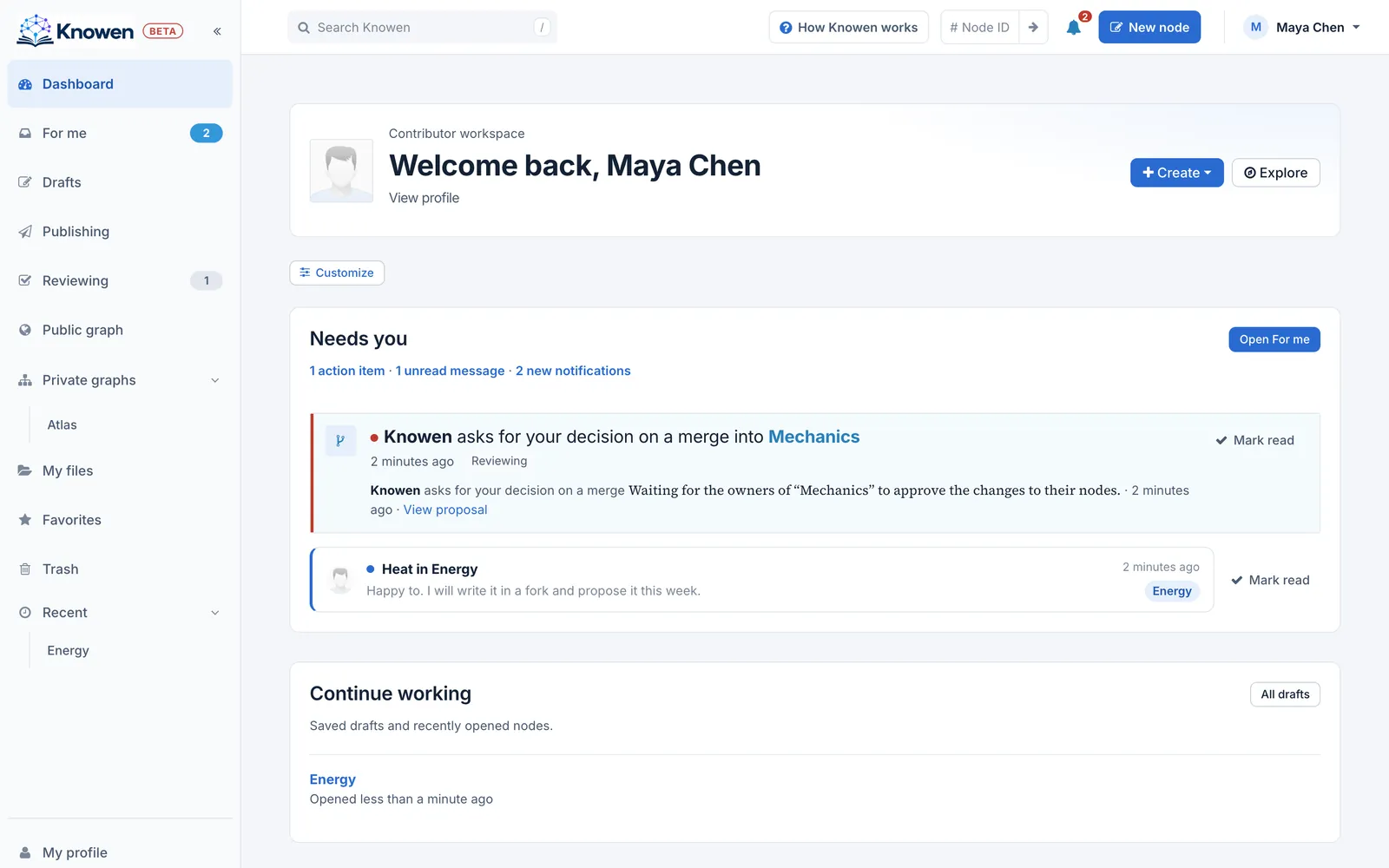
The dashboard with the sidebar on the left and the top bar above
A node's page shows one idea with everything around it: see A node's page.
Settings, from the account menu, hold your Profile, Handles, Usage & plan, API tokens and Shared links.
Tooltips. Point at any button or tab to see what it does; some also name a keyboard key.
How it is built. Pages are drawn on the server. Moving from node to node swaps the page in place, so the sidebar, the top bar and an open graph view stay put.
Read on
The dashboard: The dashboard shows what needs you first, then your work in progress, in sections you can show, hide and reorder.
A node's page: What a node's page shows: where it sits, its text and who made it, its parents and children, and the tools around it.
For me: For me collects what reaches you in three tabs, action items, messages and notifications, and counts what needs an answer.
My files: Your personal storage for documents and images, how it differs from the files attached to nodes, and who can open a file.
Finding things: Search, the graph view, favorites, recent nodes and node IDs: the ways to find a node, and to see where it sits.
**The sidebar** is the map of your work, from the top:
- **Dashboard:** where you land (see [The dashboard](/nodes/29535)).
- **For me:** what reaches you, with a count of what needs you.
- **Drafts:** edits you have not saved yet.
- **Publishing:** your proposals on their way into the public graph. **Reviewing:** proposals waiting for your answer, and those you answered (Root sees them all).
- **Public graph** and **Private graphs,** with your graphs listed under it.
- **My files** (your personal storage, see [My files](/nodes/29561)), **Favorites**, **Trash** and **Recent**.
On a phone the sidebar folds into the **☰** menu.
**The top bar**, from the left:
- **Search** (press **/**); on a node's page it can stay under that node.
- **Node ID**: type a node's number to jump to it.
- **How Knowen works**: this manual, the help (press **?**).
- The **bell**: what is new.
- **New node**: capture a private node now, and file it into a graph later.
- Your **account menu**: profile, files, settings and sign out.
**A node's page** shows one idea with everything around it: see [A node's page](/nodes/29569).
**Settings**, from the account menu, hold your **Profile**, **Handles**, **Usage & plan**, **API tokens** and **Shared links**.
**Tooltips.** Point at any button or tab to see what it does; some also name a keyboard key.
**How it is built.** Pages are drawn on the server. Moving from node to node swaps the page in place, so the sidebar, the top bar and an open graph view stay put.
---
**Read on**
- [The dashboard](/nodes/29535): The dashboard shows what needs you first, then your work in progress, in sections you can show, hide and reorder.
- [A node's page](/nodes/29569): What a node's page shows: where it sits, its text and who made it, its parents and children, and the tools around it.
- [For me](/nodes/29549): For me collects what reaches you in three tabs, action items, messages and notifications, and counts what needs an answer.
- [My files](/nodes/29561): Your personal storage for documents and images, how it differs from the files attached to nodes, and who can open a file.
- [Finding things](/nodes/29545): Search, the graph view, favorites, recent nodes and node IDs: the ways to find a node, and to see where it sits.

